
Data Toolbox
Data Toolbox is a set of tools to work with binary files.
Using Data Toolbox
The main window has a tab control, with each tab being a different tool. The following settings are shared across multiple tools:
- Offset/Data Offset is the number of bytes trimmed from the beginning of the binary file. At the moment it is only needed for the X360 version with symbols, where the offset is 0xC800.
- Ninja ASCII is an alternative way to export models and animations (motions and actions) as C structs. It outputs NJA/NAM files like in the Dreamcast SDK.
Binary Data Extractor
This tool lets you extract a single data item (level, model or action) from a binary file.

Addressis the location of the item in the file. TheMemory Addresscheckbox lets you use the memory pointer (key + actual address in the file) instead.
Struct Converter
This tool lets you convert levels, models and animations to C structs. Models and animations can also be exported as Ninja ASCII, and animations can be exported as JSON. You can use drag-and-drop to add files to the list.

Split
This tool lets you extract data from a single binary file based on a template supplied with SA Tools. Select the base template and add files to split. You can use drag-and-drop to add files to the list.

The Labels combo box lets you configure labels in SAModel files:
Address-based labelswill name items by their address, e.g.object_0014AC3Cfor anNJS_OBJECT located at 0x0014AC3C.Full labelswill name items using a label database. We have labels for the X360 prototype (SonicApp.exeonly) and partial labels forsonic.exein the 2004 PC port. When labels aren't found in the database, address-based labels will be used instead.No labelswill strip all metadata from the files. This will reduce their size but item names will be based on the item's location in the model file, not the original binary file.
SplitMDL
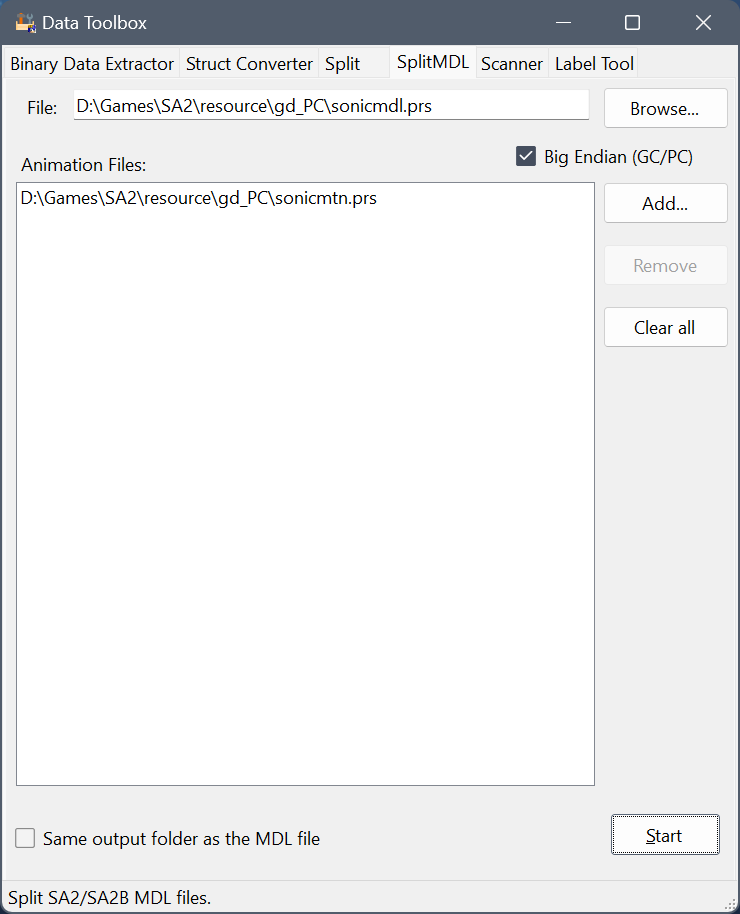
This tool lets you extract data from SA2/SA2B MDL and MTN files.

Scanner
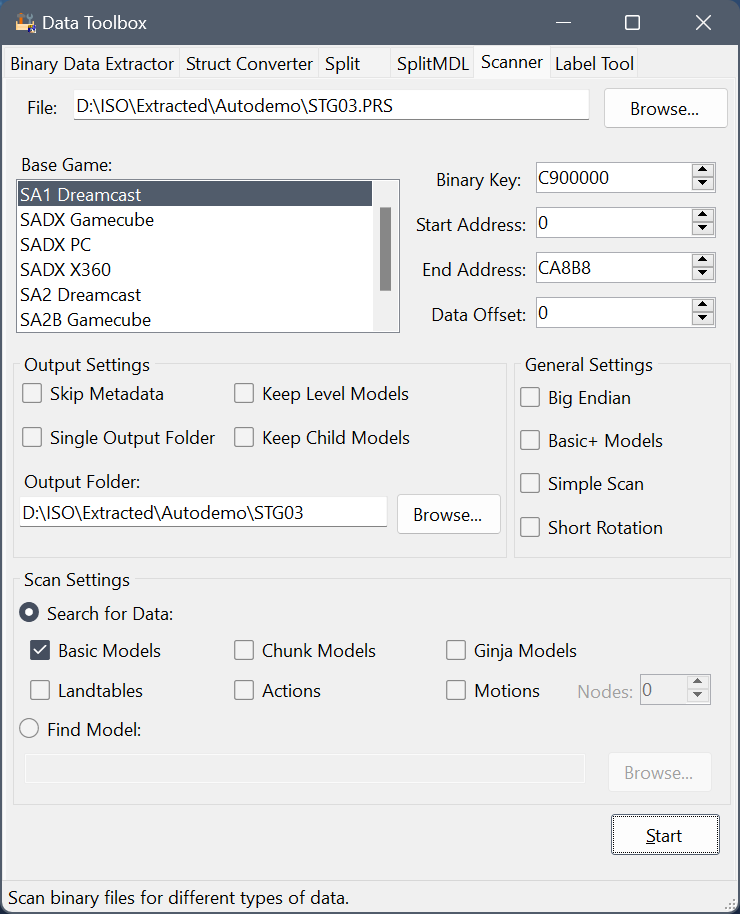
This tool lets you scan through a binary file to find different types of data in it.

- The
Base Game combo box sets game-specific settings such as landtable format, reversed color order for SADX Gamecube or Endianness.
Start Address and End Address can be used if you want to scan a specific section in the file.Skip Metadata will strip all metadata from the files. This will reduce their size but item names will be based on the item's location in the model file, not the original binary file.- When the
Keep Level Models checkbox is checked, the scanner will not delete models found to be part of a Landtable.
- When the
Keep Child Models checkbox is checked, the scanner will not delete models found to be part of another model.
- The
Basic+ Models checkbox makes the Basic model scanner look for Basic+ models (SADX PC/SADX X360) instead of regular Basic models (SA1 DC, SADX Gamecube).
Simple Scan uses a less strict check to determine whether model data is valid.Short Rotation treats rotation value in Motions as short instead of int. Some Chao animations use this.- The
Nodes numberic box lets you set the minimum number of nodes to scan for in motions. Motions with less nodes will be discarded. Set the value to 0 to find all motions.
- In
Find Model mode, the scanner will scan for models similar to the input model. At the moment only Basic and Basic+ models are supported.
See Data Locations on how to find data in binary files.
Label Tool
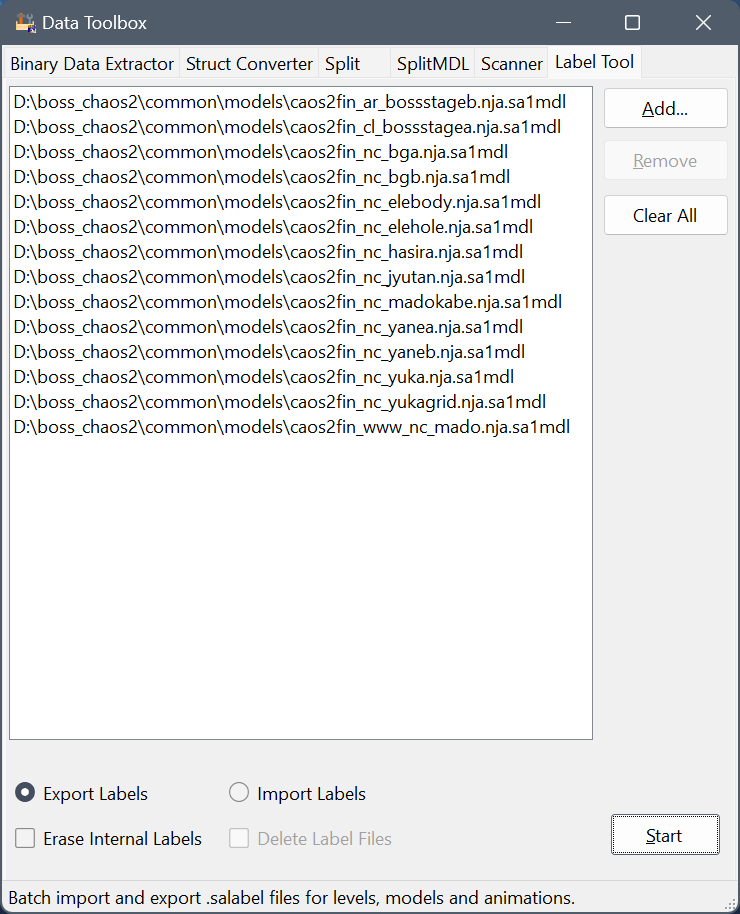
This tool lets you import and export labels embedded into SAModel files using external .salabel files.
 ☢
☢

- The
Export Labels radio button makes the tool save all embedded labels to .salabel files.
- Cheking the
Erase Internal Labels checkbox will make the tool clear embedded labels after exporting them. This can be used to reduce the size of SAModel files.
- The
Import Labels radio button overwrites embedded labels in SAModel files with labels found in .salabel files.
- Checking the
Delete Label Files checkbox will make the tool remove the .salabel files after reading labels from them.
Data Locations
Model Locations in SADX (PC, 2004)
Unlike many other games that store models in special archives or as separate files, Sonic Adventure has levels and models compiled directly into the game's code. This carried over to the ports too, and the file structure is different depending on the version of the game. In the 2004 PC port, the majority of levels and models are in sonic.exe, but some assets are also stored in DLL files in the system folder. If you're looking for something specific you need to know which file it is, so first let's have a look at the file structure.
DLLs in the system Folder
File

Contents


ADV00MODELS.DLL

Station Square level and NPC models


ADV01MODELS.DLL

Egg Carrier (outside) level models and objects


ADV01CMODELS.DLL

Egg Carrier (inside) level models and objects


ADV02MODELS.DLL

Mystic Ruins level models and objects


ADV03MODELS.DLL

Mystic Ruins Past level models, objects and NPCs


BOSSCHAOS0MODELS.DLL

Chaos 0 boss, Chaos 0 level model and some objects


CHRMODELS_orig.DLL

Playable characters


CHAOSTGGARDEN02MR_DAYTIME.DLL

Mystic Ruins Garden (Day) level model


CHAOSTGGARDEN02MR_EVENING.DLL

Mystic Ruins Garden (Evening) level model


CHAOSTGGARDEN02MR_NIGHT.DLL

Mystic Ruins Garden (Night) level model
Everything else is in sonic.exe.
Model Locations in SA1 (Dreamcast)
The Dreamcast version is a little easier to look through than the PC port because each stage is compiled into a separate binary. Character models, common objects, badniks etc. are located in 1ST_READ.BIN, key 8C010000. Stage-specific objects use the corresponding stage binary.
All binaries except 1ST_READ.BIN are PRS compressed. The following stage files are used:
Action Stages ("STG" Files)
Filename

Key

Description


STG00

C900000

Hedgehog Hammer


STG01

C900000

Emerald Coast


STG02

C900000

Windy Valley


STG03

C900000

Twinkle Park


STG04

C900000

Speed Highway


STG05

C900000

Red Mountain


STG06

C900000

Sky Deck


STG07

C900000

Lost World


STG08

C900000

Ice Cap


STG09

C900000

Casinopolis


STG10

C900000

Final Egg


STG12

C900000

Hot Shelter
Adventure Fields ("ADV" Files)
Filename

Key

Description


ADV00

C900000

Station Square


ADV0100

C920000

Egg Carrier (outside)


ADV0130

C920000

Egg Carrier (inside)


ADV02

C900000

Mystic Ruins


ADV03

C900000

Mystic Ruins (Past)
Bosses ("B" Files)
Filename

Key

Description


B_CHAOS0

C900000

Chaos 0


B_CHAOS2

C900000

Chaos 2


B_CHAOS4

C900000

Chaos 4


B_CHAOS6

C900000

Chaos 6


B_CHAOS7

C900000

Perfect Chaos


B_E101

C900000

E-101 Beta


B_E101_R

C900000

E-101 MK II


B_EGM1

C900000

Egg Hornet


B_EGM2

C900000

Egg Walker


B_EGM3

C900000

Egg Viper


B_ROBO

C900000

ZERO
Chao ("AL" files)
Filename

Key

Description


AL_MAIN

C900000

Chao body and related models


AL_RACE

CB80000

Chao Stadium and Chao Race


AL_GARDEN00

CB80000

Station Square Garden


AL_GARDEN01

CB80000

Egg Carrier Garden


AL_GARDEN02

CB80000

Mystic Ruins Garden
Other files
Filename
Key
Description
ADVERTISE
8C900000
Title screen, Super Sonic question mark
MINICART
C900000
Twinkle Circuit
SBOARD
C900000
Sand Hill
SHOOTING
C900000
Sky Chase
EV....
CB80000
Cutscenes
A_MOT
CC00000
Amys animations
B_MOT
CC00000
Big's animations
E_MOT
CC00000
Gamma's animations
K_MOT
CC00000
Knuckles' animations
S_MOT
CC00000
Sonic's animations
S_SBMOT
CB08000
Snowboard animations (Sonic)